If you know me, you know I’m utterly obsessed with keeping a pristine, chic home without sacrificing hours of my weekend to chores. That’s why the moment the stylish Narwal Freo Z Flow dropped, I couldn’t wait to test it on my hardwood floors. But when I first unboxed my Narwal and set it loose on its inaugural cleaning run, I thought something was actually broken!
Quick Fix: Why Is the Dustbin Not Emptying?
The Problem: On initial runs, heavy dirt packs into a dense brick inside the internal dustbin during the pre-dock compaction process, blocking suction flow.
The Fix: Manually clear the first dust block, perform a quick paper test to verify suction, and switch your settings in the Narwal App to High Frequency Dust Emptying.
What’s Actually Happening Outside the Dock?
That loud motor noise you hear right before the robot fully docks isn’t actually the base station emptying the dustbin. In my research and hands-on testing, I realized there are two distinct processes happening before and after docking:
- Pre-Dock Self-Cleaning: While sitting just in front of the ramp, the robot runs a quick self-cleaning cycle. It reverses its rollers and uses internal suction to pull hair off the brushes and compact the debris inside its onboard bin so it doesn’t spill across your floor or the dock ramp.
- The Actual Base Emptying: The base station auto-empties at the start of the next scheduled cleaning job or during dedicated maintenance cycles—not immediately the second it touches the charging pins.
The Main Culprit: Compacted Debris
If your base bag remains completely empty after multiple cleaning runs, the problem is almost certainly a compacted clog inside the robot’s small internal dustbin.
On my robot’s very first run across my living room, it picked up a surprisingly heavy layer of fine dust, rug fibers, and pet hair. Because I hadn’t emptied it midway through that initial deep clean, the pre-dock compaction process packed the debris into a dense, solid brick inside the onboard bin. When the base station eventually tried to pull suction, the pack was simply too tight for the dock airflow to break apart.
How I Solved It
- Manual Reset: I pulled the robot out, opened the internal hatch, and manually scraped out the packed dust block with a soft brush.
- The Paper Test: To test if the dock suction was actually working properly, I tore up a few small bits of paper, placed them in the internal bin, docked the unit, and manually triggered an empty cycle. It sucked them out instantly!
How to Force an Auto-Empty & Tweak Settings
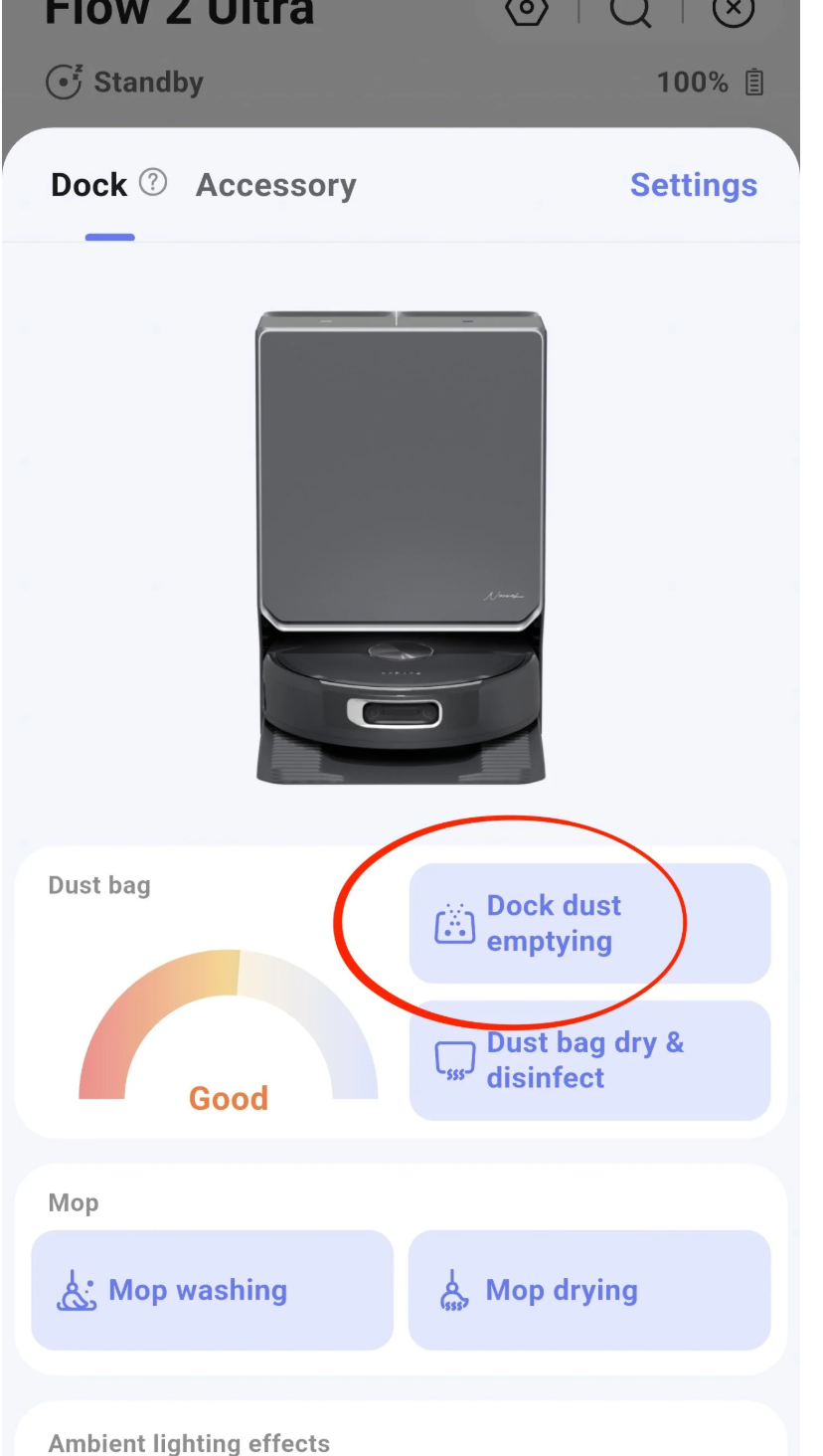
If you don’t want to wait for the next scheduled cleaning cycle to clear the onboard bin, you can easily trigger or adjust the process manually right inside the Narwal App:
1. Forcing a Manual Empty
Open your map view in the Narwal app and tap the Dock Icon on the right side of the screen (located just above the camera feed button). From there, select Manual Empty / Empty Dustbin.
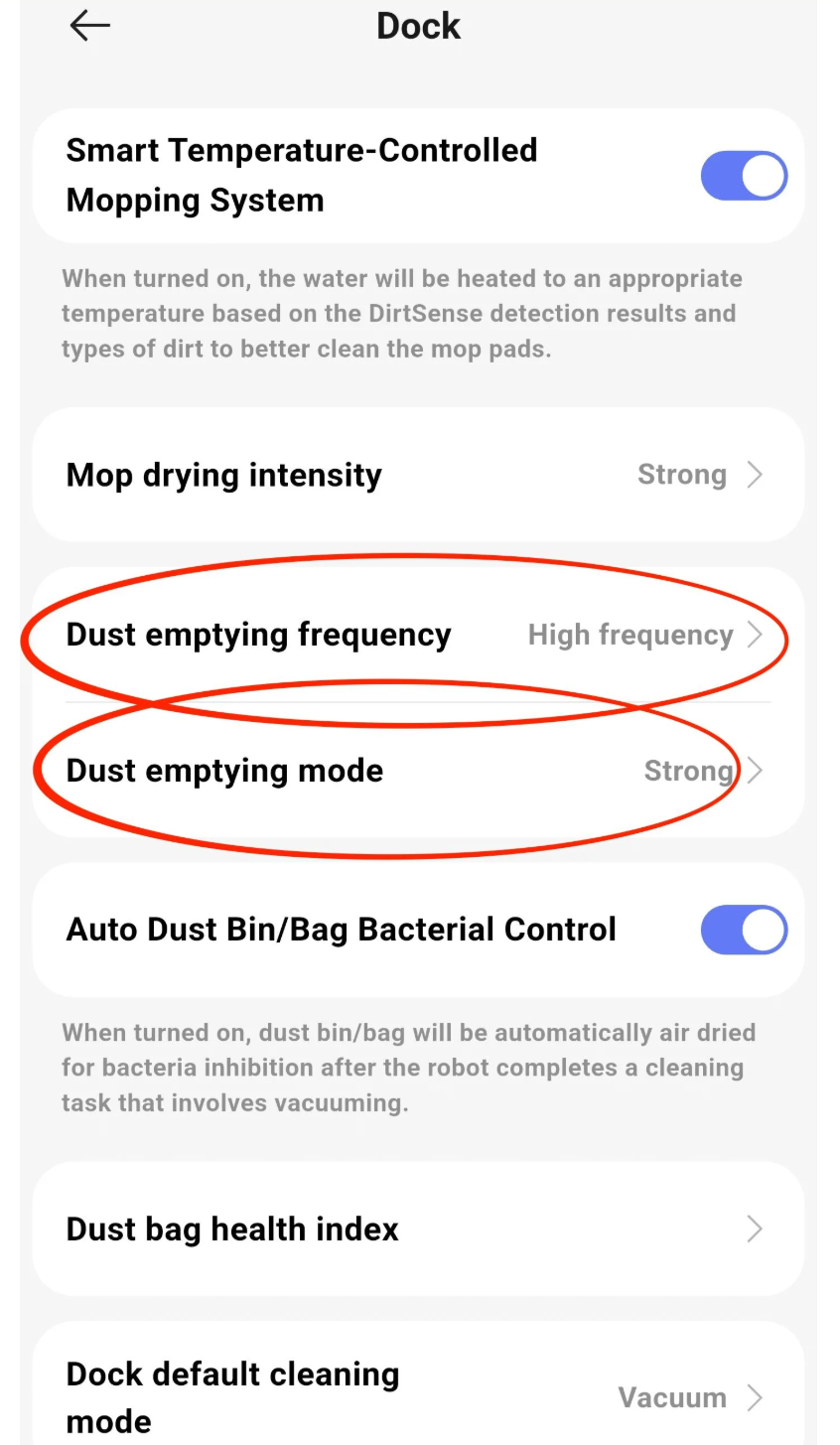
2. Changing Empty Frequency
If you have shed-prone pets, long hair, or high-pile carpets, the default frequency might let too much debris build up between docks.
- Go to Settings → Dust Emptying Frequency.
- Switch the setting from Standard to High Frequency.
This forces the robot to clear its onboard bin more frequently during cleaning sessions, preventing debris from getting compressed into an uncloggable block.
Shopping Guide: Score a Narwal Robot Vacuum and Mop on Sale
Now that you know how to smooth out the initial setup quirks, is a Narwal actually worth the investment? In my opinion: 100% yes. The dual spinning mops, intelligent obstacle avoidance, and ultra-quiet operation make it one of the absolute best home investments I’ve made all year.
However, you definitely shouldn’t pay full retail price. Narwal runs fantastic promotional events throughout the year. If you are hunting for a Narwal robot vacuum and mop on sale, timing is everything.
Be sure to check out my detailed robot vacuum and mop sales calendar to track major holiday markdowns, flash sales, and exclusive promo codes before you buy!
When Is the Best Time to Buy?
| Sale Event | Expected Discount Range | Suri’s Insider Tip |
|---|---|---|
| Prime Day / Mid-Summer Sales | 25% – 35% OFF | Look out for bundle deals including extra mop pads and dust bags. |
| Black Friday & Cyber Monday | Up to 40% OFF | The biggest drop of the year. Bookmark our deals page early! |
| Spring Cleaning Promotions | 20% – 30% OFF | Great timing if you want to refresh your floors ahead of summer. |
Who Should Buy the Narwal Freo Series?
Who Will Love It:
- Pet owners fighting constant fur and dander.
- Busy professionals who want spotless, freshly mopped floors every single morning.
- Anyone who appreciates sleek, modern design that blends seamlessly into chic home decor.
Who Should Skip:
- Budget shoppers looking for a basic $150 entry-level vacuum without mopping capabilities.
- Homes with extremely high-threshold steps between rooms that no robot can cross.
Frequently Asked Questions
Is the Narwal robot vacuum and mop worth the price?
Yes! Between the self-washing mop pads, smart dirt detection, and powerful suction, it saves hours of weekly cleaning. Getting a Narwal robot vacuum and mop on sale makes it an unbeatable value for luxury home maintenance.
How often should I change the high-frequency bin settings?
I recommend keeping it on High Frequency during the first week of use or whenever you do a seasonal deep clean. Once your floors maintain a steady baseline of cleanliness, you can switch back to Standard mode.
Where can I find active Narwal promo codes and deals?
I continuously update all verified discount codes on my dedicated Narwal sales hub and overall robot vacuum sales calendar.
My Final Takeaways
- First runs require monitoring: On its first pass through a home, the robot will pick up significantly more build-up than usual. Check the onboard bin manually after run #1 to ensure it hasn’t jammed.
- Don’t mistake roller-cleaning for bin-emptying: If the robot is making noise outside the station, it’s just self-cleaning its brushes—not failing to empty.
- Bump up the frequency: Switching to high-frequency emptying in the app completely eliminated auto-empty failures for me.
I hope this troubleshooting breakdown saved you from a minor home panic! Keep your eyes on our Narwal sale updates page to grab the best deals on replacement accessories and new units. Happy cleaning, loves!


